

This guide will show you how to Adjust Egg Hatch Times on your Palworld Server
Not a client yet? Order a Palworld Server today with Citadel Servers
In Palworld, eggs can be incubated to obtain new Pals, but the default incubation time may not always suit every server's preferred gameplay experience. Server owners can adjust the amount of time required for eggs to hatch, allowing them to create a faster-paced experience or make egg incubation more time-intensive for added progression. Changing the egg hatch time can be particularly useful for servers with custom progression systems, community servers, or playstyles where players want to spend less time waiting for eggs to incubate. Depending on your preferred configuration, you can reduce the incubation time to allow eggs to hatch more quickly or increase it to make the process take longer. This setting is controlled through your Palworld server's world configuration. Once changed, the new setting will affect egg incubation duration on the server, helping you maintain a consistent experience for everyone playing. In this guide, we'll walk you through locating the egg incubation setting, setting the desired hatch time, and applying the changes to your Palworld server.
Modifying Egg Hatching Speed
1. Log in to your Game Control Panel.
2. Before making any modifications, stop the server from running by clicking the Stop button.

3. Navigate to the Configuration Files section.

4. In Configuration Files, look for the Pal\Saved\Config\WindowsServer\PalWorldSettings.ini file and click the Text Editor beside the Config Editor.

5. In the Text Editor, locate the PalEggDefaultHatchingTime parameter and enter your desired incubation time in hours.
For example, setting the value to .5 reduces the default incubation time by half, effectively doubling the egg hatching speed.
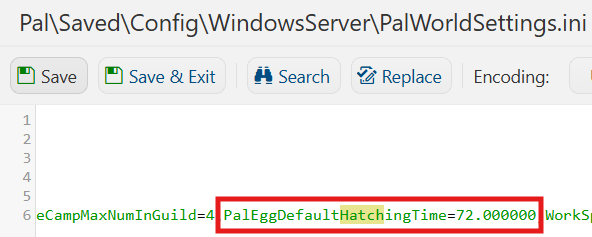
(Note: The value represents real-time hours required to hatch Massive Eggs, rather than in-game hours. Smaller egg types may hatch in less time depending on their incubation duration. After changing this setting, any eggs already placed in an incubator must be removed and placed back into the incubator for the new hatch-time settings to take effect.)
6. After editing, click Save to apply the changes.

You can now start playing on your server.
Did the above information not work for you?
Please click here to contact our support via a ticket.