
This guide will show you how to adjust Fishing Difficulty Settings on your Enshrouded Server
Not a client yet? Order an Enshrouded Server today with Citadel Servers
Fishing is one of the many activities players can enjoy while exploring Enshrouded, providing an additional way to gather resources and experience the world of Embervale. However, the fishing minigame can be more challenging depending on the difficulty selected for your server. As a server owner, you can customize this setting to make fishing more accessible for casual players or introduce a greater challenge for those who prefer a more demanding gameplay experience. Enshrouded includes a dedicated Fishing Difficulty configuration option that determines how challenging the fishing minigame becomes. This setting affects the strength and endurance of fish, as well as the timing required for players to successfully reel in their catches. Depending on your preferred difficulty, you can choose from several options, ranging from Very Easy to Very Hard. Adjusting the fishing difficulty can be particularly useful if you manage a server with players who have different experience levels and gameplay preferences. For example, selecting an easier difficulty can make fishing more forgiving and accessible to newcomers, while choosing a harder option can provide experienced players with a more engaging challenge. You can also retain the default difficulty to preserve the standard fishing experience. In this guide, we'll walk you through how to configure and adjust the Fishing Difficulty setting on your Enshrouded dedicated server. We'll explain what each difficulty option does, where the setting is located in your server configuration, and how to apply your preferred changes. Whether you want to make fishing easier, maintain the default experience, or increase the challenge for your community, this guide will help you customize the fishing mechanics to suit your server's gameplay style. Before making any changes, we recommend stopping your server and creating a backup of your enshrouded_server.json configuration file. This helps protect your existing settings and allows you to restore your previous configuration if anything goes wrong.
(Important: The fishing difficulty setting is part of the server's individual gameplay settings. Make sure your server's gameSettingsPreset is set to "Custom" when manually configuring individual gameplay options; otherwise, the selected preset may override those values.)
Managing Fishing Settings
1. Log in to your Game Panel and navigate to your service.
2. Before making any modifications, stop the server from running by clicking the Stop button.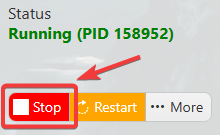
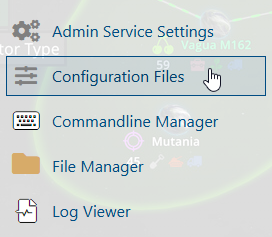
3. Navigate to the Configuration Files section.
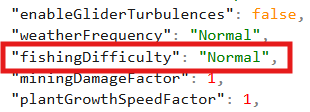
4. Open the Text Editor and locate the fishingDifficulty parameter. Modify its value according to your preferred fishing difficulty to customize the gameplay experience on your server.
| Setting | Preset |
Normal |
Default |
Easy |
Relaxed |
Normal |
Hard |
Hard |
Survival |
Very Easy, Very Hard |
Custom |
5. After editing, click the Save button to apply the changes.

Did the above information not work for you?
Please click here to contact our support via a ticket.
