

Looking to rent an America's Army: Proving Grounds server? Click here to order your server today!
This guide will show you how to add UMM maps to the voting list and map rotation.
NOTE: Stop the server first before making any changes.
Log in to your Game Control Panel.
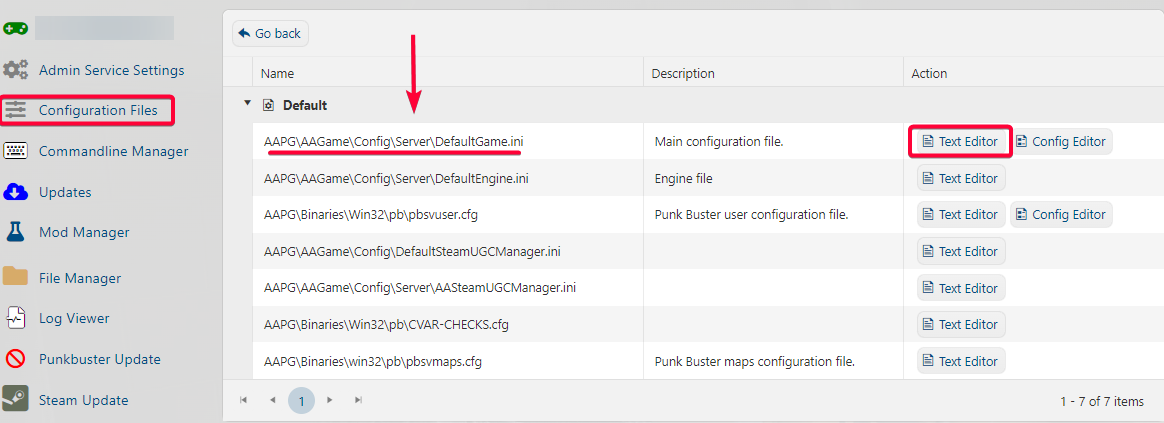
Open Configuration Files and navigate "DefaultGame.ini"
Open it via "Text Editor"
Please refer to the image below.
Scroll down and find this parameter for voting
";This is the list of possible maps players can vote to. Please keep it in alphabetical order"
You can add the UMM map here by including this parameter:
+MapVoteList="UMM"
Note: Replace UMM with the appropriate map name.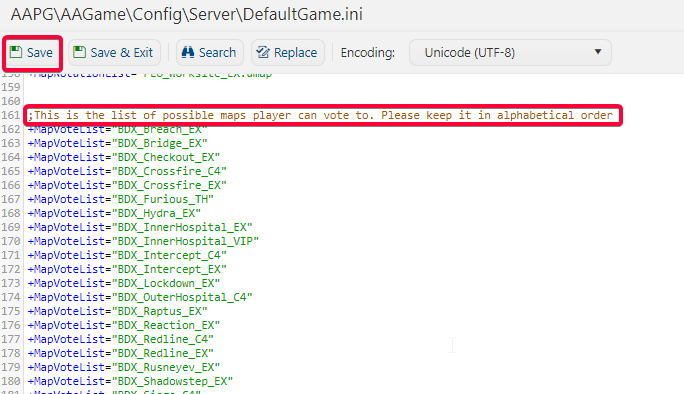
The same applies to Map voting; you need to find this parameter for map rotation.
";This list determines which maps the server will rotate through"
You can add the UMM map here by including this parameter:
+MapRotationList="UMM"
Note: Replace UMM with the appropriate map name.
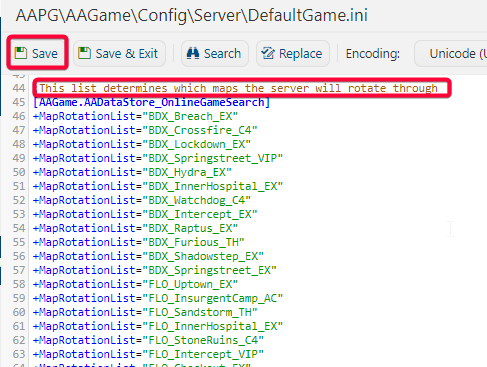
After adding your UMM, do not forget to Hit "Save"
Start your server and verify if the UMM is now added to your map and voting list.
Note:
Do not use more than 20 maps in the MapVoteList or your server might bug out. You can only have 3 custom maps listed in the MapVoteList section.
Do not use more than 39 lines of code in the MapRotationList and MapVoteList sections, or your server might have errors.
Did the above information not work for you? Please click here to contact our support via a ticket.